The audit itself is rarely the problem. Everything around it is.
It starts weeks in advance: a schedule in Excel, emails to get everyone together on the same day, evidence scattered across five different folders. After the audit comes the report and then the findings often end up in a drawer. Until the next audit when you start all over again.
That’s why we built the new audit module in ISOPlanner: internal audit software that lives inside your management system, so every audit builds on the last one instead of starting from zero.
Where internal audits get stuck
In most organizations, things don’t go wrong because of a lack of knowledge or effort. They go wrong because of fragmentation. If you still organize internal audits with separate tools, you’ll probably recognize a few of these:
- The scope is set again every year without a clear view of what was checked last year.
- Auditors piece together evidence from folders, emails and old reports.
- Every auditor works in their own way, which makes results hard to compare.
- The report is put together by hand and quickly falls behind reality.
- Nonconformities are recorded, but nobody tracks whether they actually get resolved.
As a result, an audit remains little more than a snapshot, while the real value lies in what you do with it afterwards.
The complete internal audit process in one place
With the ISOPlanner audit module, you manage the entire audit workflow in one place: from planning and conducting internal and external audits to recording findings and following up on improvement actions.
The difference from a standalone schedule: your audit work is linked to your standards, controls, processes and evidence. So your audit doesn’t sit next to your management system. It’s part of it.
- Targeted planning. Set up a one-off or recurring audit against one or more standards, such as ISO 27001 and ISO 9001. When defining the scope, you see risk scores and which items haven’t been audited in a long time or ever.
- Divide the work. Assign items to your team and spread them across the audit days. For each item, you see who is responsible, how far along it is and which outcome has been recorded.
- Evidence at hand. For every control, process or risk, you’ll find the documents, evidence and previous audit results. You record answers and conclusions right there.
- Work consistently. Reusable procedures and audit criteria make clear what needs to be checked and which evidence is required. That way your whole team follows the same approach.
- Follow up on deviations. Create a follow-up task straight from a finding. You can only publish an audit once every nonconformity has a linked finding so nothing slips through unnoticed.
- Report together. Generate a report from your own template, let your team add to it in Word and publish the final version as a PDF. For each item, you decide which status is updated in your management system when you publish.
Example: one internal audit for ISO 27001 and ISO 9001
Here’s what that looks like in practice. Say you’re preparing your annual internal audit for both ISO 27001 and ISO 9001.
- You set up one recurring audit against both standards. While defining the scope, you see which controls and processes carry the highest risk scores and which haven’t been audited for a while.
- You split the work across two audit days and assign each item to an auditor. You schedule the Teams meetings from the audit and the work shows up in everyone’s task list.
- During the audit interviews, each auditor finds the documents, evidence and last year’s results right next to the item they’re reviewing and records answers and conclusions there.
- Two nonconformities come up. Each one gets a finding with a follow-up task, an owner and a deadline.
- You generate the report from your own template, finish it together in Word and publish it as a PDF. ISOPlanner then creates next year’s audit, with this year’s scope and results ready as a starting point.
No spreadsheet, no hunting for evidence, and no findings lost in a drawer.
Every audit makes the next one easier
This may well be the biggest gain. Once you publish an audit, ISOPlanner automatically creates the next one in your recurring schedule. You reuse the scope and audit setup, and previous results stay available for reference. Feedback from each audit helps you keep refining your audit criteria and procedures. So you never start from scratch again.
AI support, with your team in control
You can also let AI help, for example with scope suggestions, draft audit criteria, and reviewing documentation and evidence for controls and requirements. AI also gives you a head start on conclusions, report summaries and proposals for follow-up findings. These always remain suggestions: your audit team reviews them and has the final say. Prefer not to use AI? The module works just as well without it.
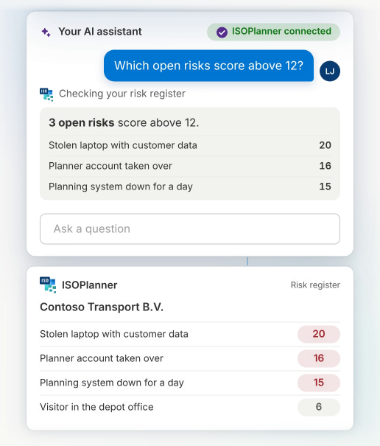
Already use an AI assistant such as Claude, ChatGPT or Copilot? Connect it to ISOPlanner via MCP and ask questions about your management system, answered from your live data. Your own ISOPlanner role applies, nothing changes without your approval and every call is logged.
Works in Microsoft 365, the way your team already does
Because ISOPlanner works within Microsoft 365, your team doesn’t need to learn new habits. You schedule Teams meetings from the audit and see in Outlook when participants are available. Audit work shows up in the task lists of the people involved. Reports are stored in SharePoint, where you work on the draft together in Word and previous versions are kept.
When Premium is the logical next step
The audit module is part of Premium, the plan for organizations that manage multiple standards and audits. You can see what Premium costs on our pricing page. So the question isn’t just what the module can do, but also whether your organization is ready for it. Premium is a particularly good fit if:
- you work with multiple standards, such as ISO 27001, ISO 9001 or NIS2, and want to cover them in a single audit;
- you run several internal audits a year and spend a lot of time preparing for each one;
- you work with an audit team and want everyone to follow the same approach;
- you want to show quickly during an external audit or certification that findings have actually been followed up.
Sound familiar? Then Premium mainly saves you time. Fewer hours spent planning, searching and reporting means more room to improve your management system. And because every audit builds on the previous one that gain grows every year.
Frequently asked questions
What is internal audit software?
Internal audit software helps you plan, conduct and follow up internal audits in one place. Instead of spreadsheets, emails and separate folders, your scope, evidence, findings and follow-up actions sit together. So you always know what was audited, what was found and whether it was resolved.
Can I audit multiple ISO standards in one audit?
Yes. You can set up an audit against one or more standards, such as ISO 27001 and ISO 9001, and cover them in a single audit.
Does the audit module also support external audits?
Yes. You can plan and conduct both internal and external audits, and record findings and follow-up actions for both.
Do I have to use AI?
No. AI only makes suggestions, which your audit team reviews. The module works just as well without it.
Which ISOPlanner plan includes the audit module?
The audit module is part of Premium. See our pricing page for details.
See the audit module in action
Curious what this looks like for your organization? In a demo, we show you how to set up, conduct and publish an internal audit, with your own standards as the starting point. Prefer to look around first? On the audit module page, you can see the module in action and click through the interactive demos. Want to read more? Check out the guide How to use the Audit Module in our knowledge base.