
100% Hosted in the EU
ISOPlanner™ gives an auditor or consultant a single, organized view of your full compliance program. When an auditor arrives, you walk them through your implementation directly in the platform. Every control, every piece of evidence, every decision. Presented clearly, without the confusion of folder structures.

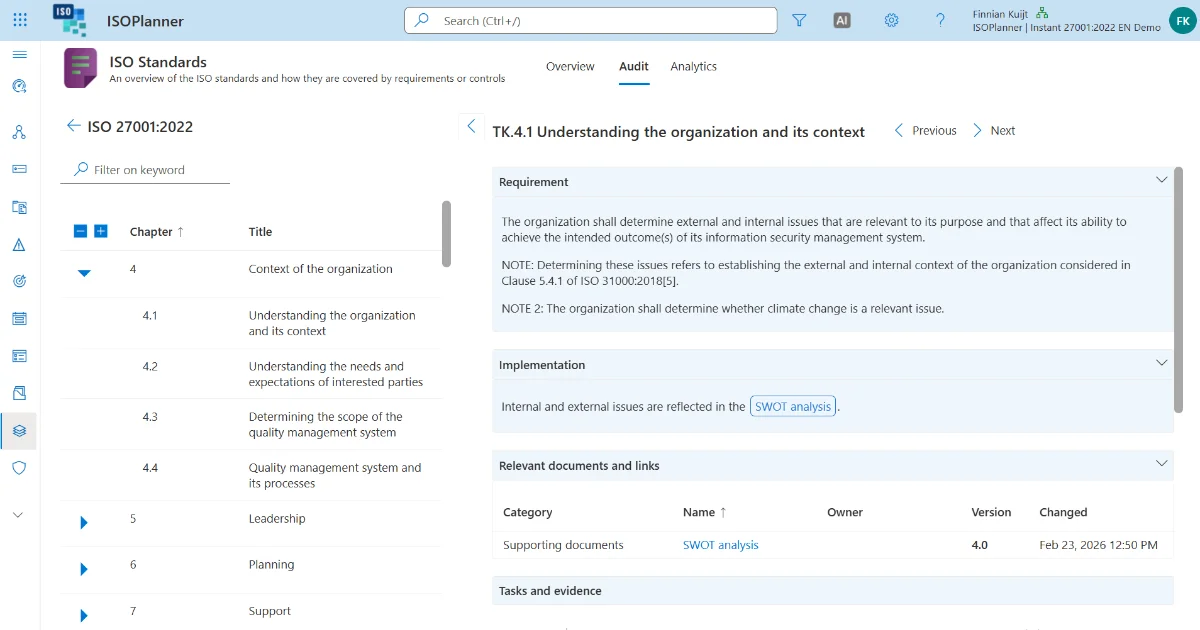
If you want to give an auditor direct access to review independently, you can. An auditor can find and review needed information on their own without your interferance or guidance. This makes the process smooth and more independent.
Internal auditors use the same environment. Tasks are visible directly in the controls and risks they relate to, creating a traceable internal audit trail without any additional administration.

That number is not luck. It is what happens when the auditor can see everything, immediately. Every control in place. Every piece of evidence where it should be. The full scope, ready to verify the moment they log in. Prepare like that, and passing the first time stops being a hope.
01.
How is auditor access typically handled, and what problems does that create?
Most organizations handle auditor access with ad hoc email threads, shared folders without clear boundaries, or third-party portals that add friction for everyone. There is no clean audit trail of what was shared, access is hard to revoke, and preparation is reactive rather than structured.
02.
How does ISOPlanner™ manage auditor access?
Through SharePoint permissions and Microsoft guest accounts. Auditors access compliance documentation directly in SharePoint. No third-party portal to configure, no separate login system to manage, no export package to prepare. Your organization defines what the auditor can see using the SharePoint permissions your IT team already administers.
03.
How are external auditors set up as guest users?
As Microsoft guest accounts through standard Microsoft 365 functionality. No additional software, no ISOPlanner™ specific configuration, no external vendor involvement. When the engagement concludes, access is revoked through the same Microsoft 365 admin panel used to grant it.
04.
How is audit scope defined in advance?
Link the relevant controls, documents, and evidence to the audit object before the auditor arrives. Preparation checklists confirm everything required is in place before access is granted. When the auditor asks a question, navigate to the control and present the full history, without searching across systems.
05.
Do external auditors need an ISOPlanner™ license?
No. Guest accounts in ISOPlanner™ are free and do not require a license. Access is scoped to exactly what the auditor needs through SharePoint permissions. Everything outside that scope remains inaccessible.
06.
How are internal audits handled in the same system?
The same access control model applies. Internal auditors are team members with scoped permissions for the relevant review period. Their findings are recorded in ISOPlanner™ against the controls they reviewed, creating a traceable internal audit trail that supports external certification.
07.
What is ISOPlanner's first-time certification success rate?
87% of ISOPlanner™ customers pass their first certification audit. That result comes from more than 200 implementations. Structured preparation, organized evidence, and clean auditor access are a significant part of that outcome.




Log in to your ISOPlanner™ workspace, or start a free trial.
Log in Start your free trial